Import messy delivery input
Use screenshots, long images, videos, files, pasted text, or manual addresses as the source of your run.
Import your delivery list, review the addresses, then send up to 14 planned stops to Apple Maps in one push—without adding each destination one by one.
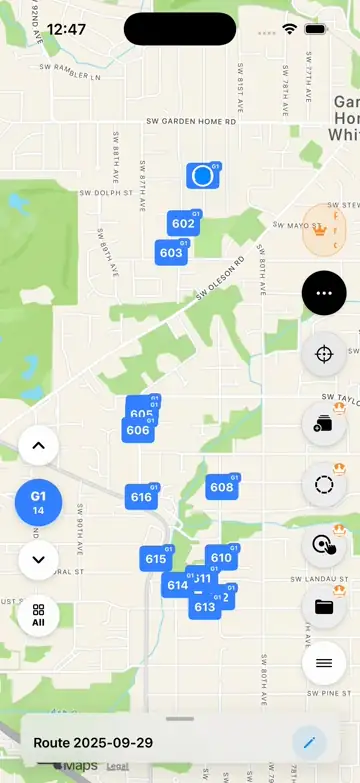
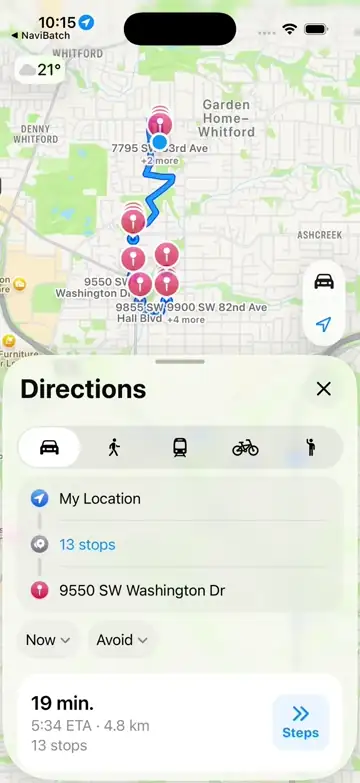
Apple Maps is useful for navigation, but delivery drivers often start with a long list of stops from another app, screenshot, dispatch list, or video. The slow part is turning that list into a route without typing, copying, and adding every destination manually.
NaviBatch focuses on the setup step before navigation. It helps convert delivery lists into reviewed stops and uses a patent-pending one-push handoff to move a group of stops into Apple Maps faster.
Use screenshots, long images, videos, files, pasted text, or manual addresses as the source of your run.
Review recognized addresses, order numbers, duplicates, and route groups before starting the drive.
Send up to 14 stops to Apple Maps in one action instead of repeating the same setup for every stop.
Add screenshots, long screenshots, videos, files, pasted text, or manual addresses.
Confirm addresses and delivery order numbers before route handoff.
Optimize the full route, keep the imported order, or optimize only within a selected group. Then prepare an Apple Maps-sized group.
Send the planned group into Apple Maps and start navigation.
The one-push handoff does not decide the delivery order. First, the driver reviews the addresses and chooses how much of the route to optimize. After that order is ready, NaviBatch sends the selected group to Apple Maps for turn-by-turn navigation.
For a normal address list without a required company sequence, optimize the route across all reviewed stops before grouping.
For a last-mile run loaded around existing stop numbers, keep the overall sequence and optimize only the addresses inside the selected group.
Once the order and group are confirmed, send up to 14 planned stops to Apple Maps in one push. Apple Maps then handles navigation.
Apple's iPhone User Guide says Apple Maps can add up to 14 stops along a multi-stop driving route. NaviBatch uses that real Apple Maps behavior as a practical boundary: prepare a reviewed group in NaviBatch, then hand that Apple Maps-sized group to navigation when it is ready.
This is why the review step matters. Delivery screenshots, videos, and dispatch lists can include apartment numbers, abbreviations, and OCR-sensitive text. NaviBatch helps the driver check the stop list before the group goes to Apple Maps.
When a route has dozens or hundreds of packages, small repeated actions become expensive. NaviBatch supports route optimization, but the one-push value is separate: it reduces the operational friction between receiving a stop list and starting the next delivery segment.
This is why NaviBatch combines address import, route grouping, Apple Maps handoff, package finder, and delivery workflow tools inside one iPhone workflow.
Yes. Apple's iPhone User Guide says Apple Maps can add up to 14 stops along a multi-stop driving route. NaviBatch prepares reviewed Apple Maps-sized groups and sends up to 14 planned stops in one action.
No. Handoff and optimization are separate steps. NaviBatch can optimize a normal address list across the full route, or optimize only within a selected group when a last-mile driver needs to preserve the overall scan and loading sequence. After review, the handoff sends up to 14 planned stops to Apple Maps.
No. NaviBatch handles delivery input, review, optional optimization, grouping, and handoff. Apple Maps handles turn-by-turn navigation.
Drivers can organize larger runs into reviewed groups, then send each Apple Maps-ready group when it is time to navigate.
Drivers may scan and load packages around an existing stop order. Keeping the overall sequence in groups avoids globally rearranging that loading plan, while still allowing the addresses inside a selected group to be optimized before handoff.
Import your next delivery list and send up to 14 stops to Apple Maps in one push.
Download NaviBatch