ROUTE PLANNING, WITHOUT THE REPETITION

Send 14 stops to Apple Maps in one push

Built for delivery drivers who need to move faster.

Import delivery addresses from screenshots and videos, optimize the run, then hand the full route to Apple Maps in one action.

14 stops
One push
Fewer taps
Workflow
Apple Maps
Ready
NaviBatch sends a complete 14-stop route to Apple Maps with one push

Key Features

NaviBatch offers powerful features to optimize your route planning and navigation experience

Practical Route Planning

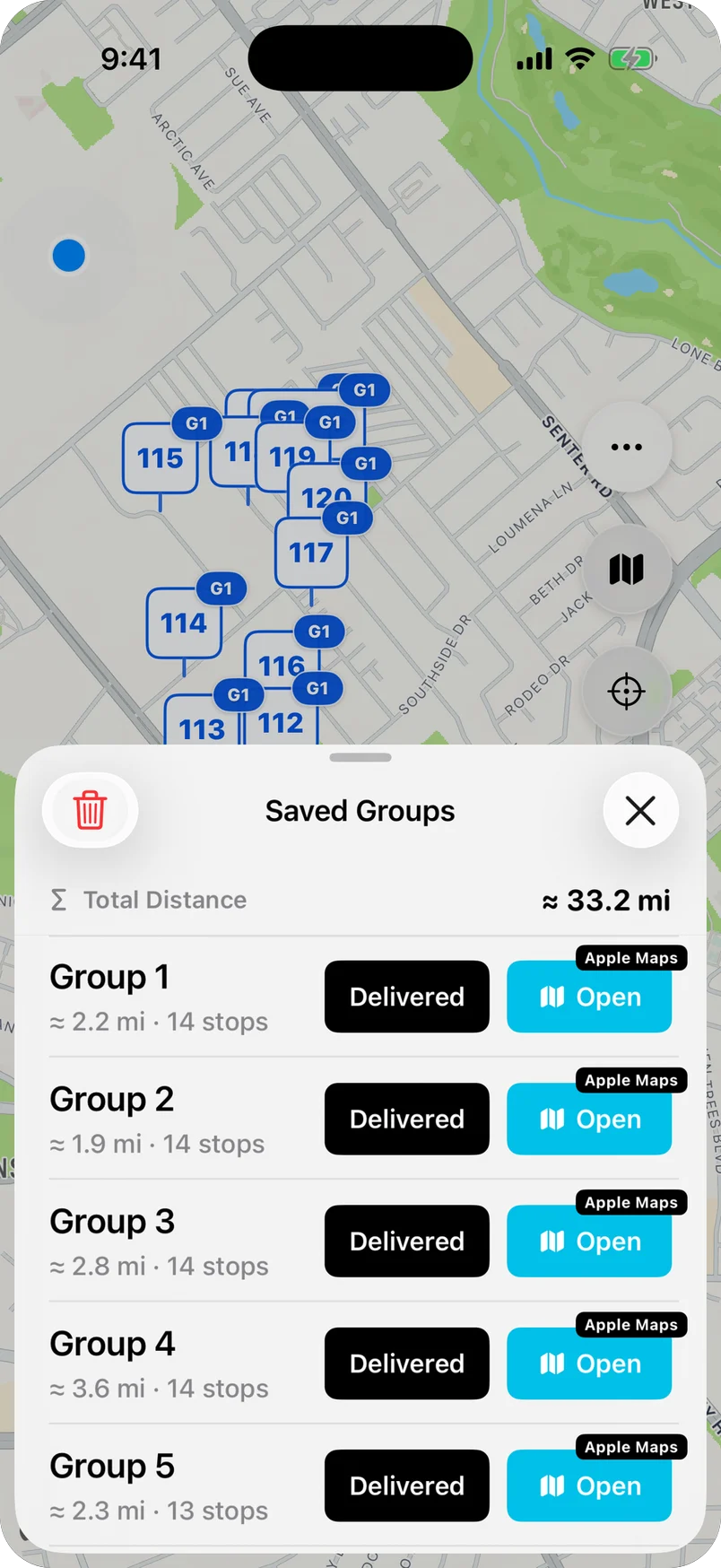
Organize multi-stop delivery work, review addresses before driving, and hand planned route groups to Apple Maps with fewer repeated actions.

Turn-by-Turn Navigation

Get clear voice-guided directions with real-time traffic updates to each stop on your route.

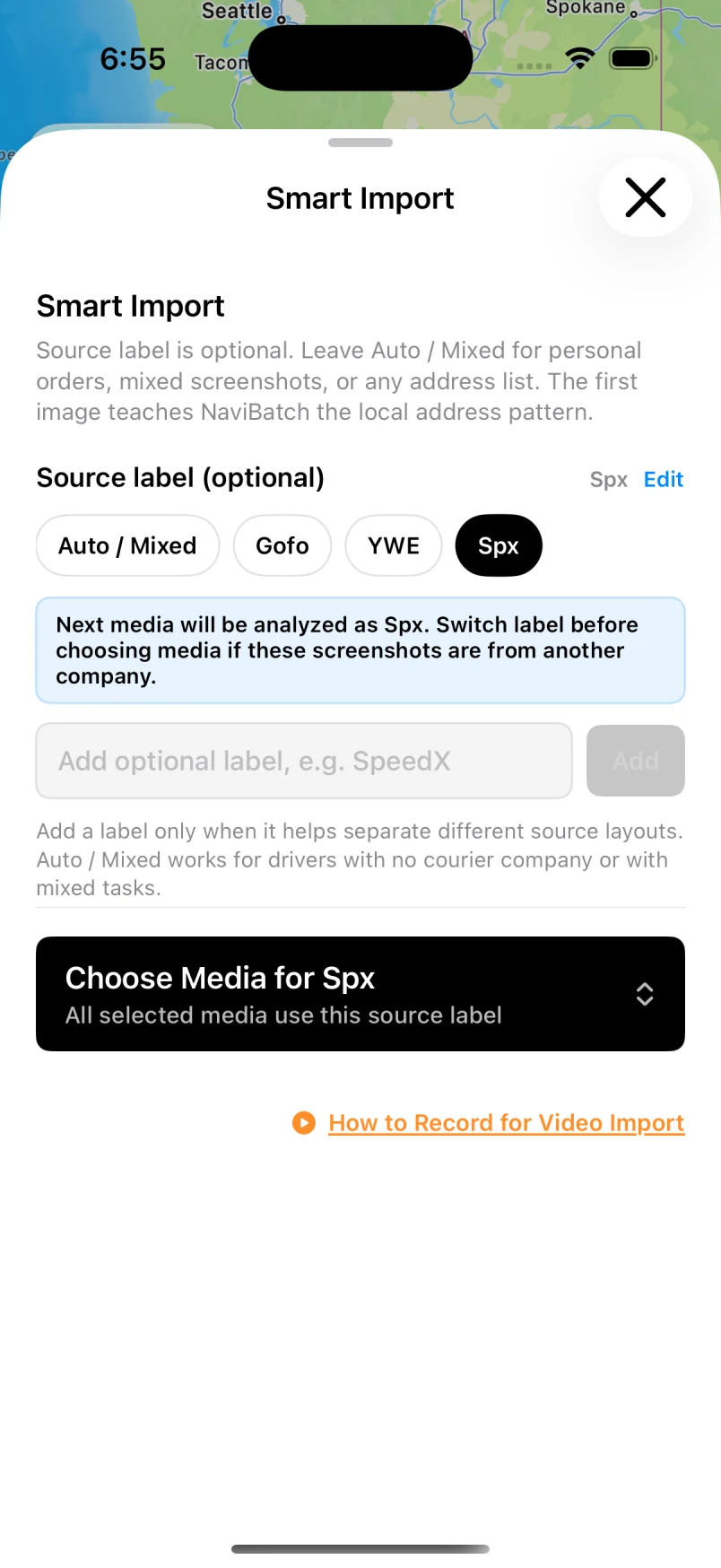
Import Addresses from Screenshots

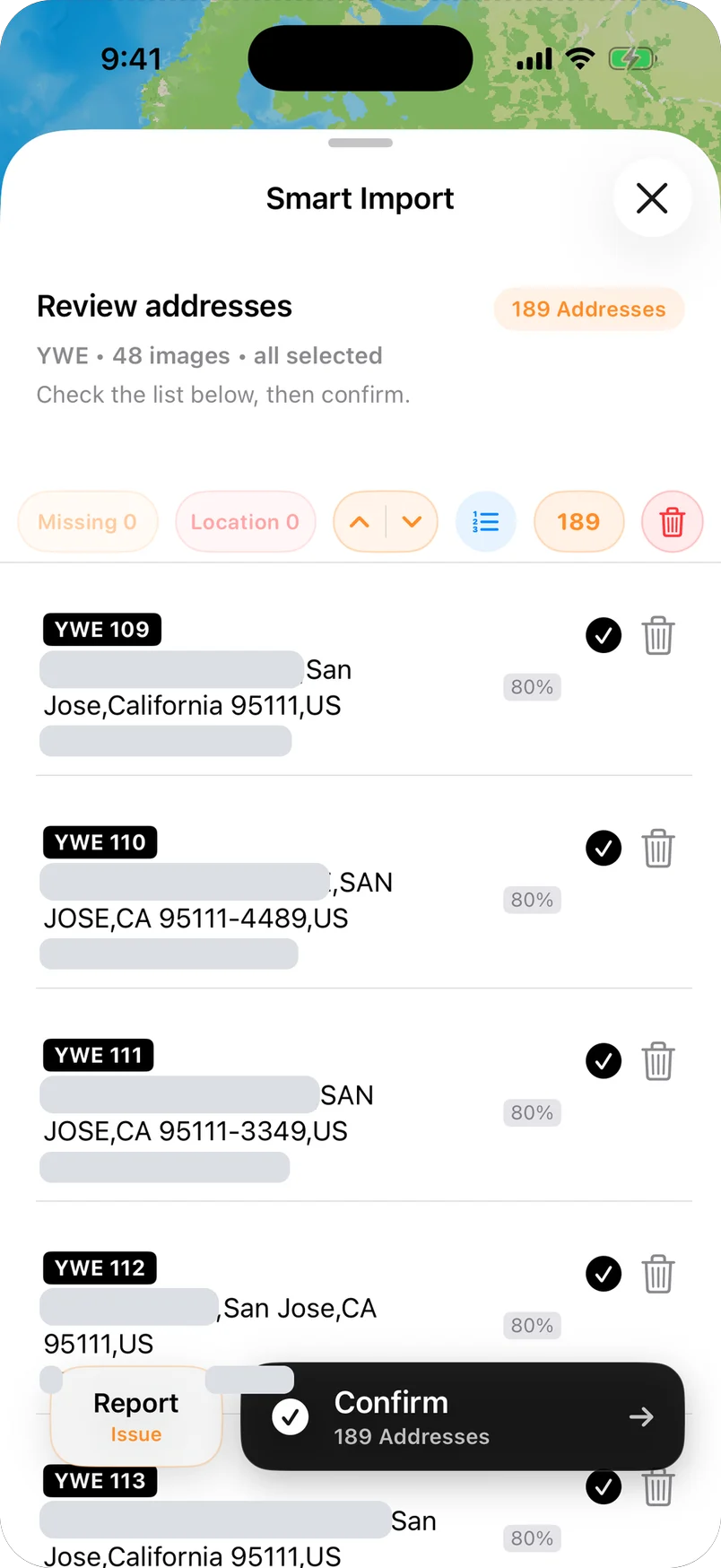
Turn delivery screenshots and photos into ready-to-route stops without retyping addresses one by one.

Package Finder

Quickly locate specific packages in your vehicle with our smart search feature, saving valuable time at each stop.

Time Window Planning

Set specific delivery or arrival time windows for each stop and optimize routes accordingly.

Delivery Sequencing

Manually adjust the order of stops when needed or lock priority destinations in place.

Multi-Factor Route Planning

Our routes consider traffic patterns, road types, distance, delivery windows, and vehicle limitations for truly optimized delivery paths.

Proof of Delivery

Capture door numbers, package labels, and placement photos for delivery proof and dispute reduction. Available in the free version!

Built for Real Delivery Work

Not generic trip planning. A workflow designed for drivers who need to move a full run into Apple Maps fast.

Intelligent Route Optimization

Automatically calculate the best routes to minimize driving distance and time.

Batch Address Processing

Import multiple addresses at once instead of pushing stops manually one by one.

One-Push Apple Maps Navigation PATENT PENDING

After planning, send the full route to Apple Maps in one action.

ETA Estimation

Accurately predict arrival times to plan your work schedule effectively.

Multi-Stop Navigation Tool for Individuals

Whether it's daily multi-location trips or weekend itineraries, NaviBatch helps you reach every destination more easily.

Intuitive Interface

Add multiple locations in seconds with a simple, easy-to-learn interface.

Flexible Route Settings

Choose to avoid highways and toll roads to match your travel preferences.

Import Addresses from Videos

Extract frames from delivery videos and capture addresses faster when your workflow starts with recorded footage.

Save & Share Routes

Save frequent routes and share them with family and friends with one tap.

Why NaviBatch Feels Different

The real difference is simple: other apps still feed Apple Maps one stop at a time. NaviBatch sends the route in one push.

Typical Route Planner

  • Push each stop separately
  • Repeat the same action again and again
  • Easier to lose the visit order
  • More taps, more room for mistakes
  • Slower whenever the run changes
One stop per push
VS
Less pushing. More driving.
Typical Route Planner
Push stop, repeat

A More Practical Tool Than Generic Route Apps

NaviBatch is built around real delivery friction: batch input, one-push Apple Maps handoff, proof of delivery, and package workflow support.

$13.99/month or $109.99/year
  • No proof of delivery in free version
  • Free version limited to 15 stops
  • No batch navigation feature
  • Clunky interface, super slow workflow
  • No package finder feature
$10/month - $20/month
  • Free version capped at only 10 stops
  • Can't add stops via camera in free version
  • No arrival time windows in free version
  • Package finder (paid version only)
  • No batch route optimization
Key Features Competitor NaviBatch
Free Version Stops Max 15 20 stops + better features
Delivery Photo Proof Paid version only Included in FREE version!
Batch Navigation Speed Standard One-push handoff PATENT PENDING
Package Finder Not available Fully supported
Delivery Industry Focus Partially optimized Totally delivery focused
Photo Management System Disorganized storage Smart Albums, Auto-categorized!
Real Delivery Experience
15913
200+daily packages
14stops in one push
Reviewbefore routing

Built by Delivery Drivers, For Delivery Drivers

We personally delivered 200+ packages daily for 3 months before creating NaviBatch

Most route planning apps are created by developers who've never delivered a single package. NaviBatch is different.

"Before writing a single line of code, our entire team spent 3 months delivering packages ourselves - 200+ packages daily. We experienced every challenge firsthand: confusing addresses, time pressure, package sorting nightmares, and the frustration of manually entering addresses one by one."

This real-world experience changed everything. We didn't build NaviBatch based on theory - we built it to solve the actual problems we faced on the road every day.

Every feature in NaviBatch comes from a real delivery pain point we personally experienced. That's why delivery professionals love our app - because it was truly built by drivers, for drivers.

200+
Daily Packages Delivered
3
Months on the Road
18,000+
Total Packages Delivered

How It Works

Build the run, optimize it, then hand Apple Maps the whole route instead of pushing stops one by one.

1

Add Addresses

Add multiple destinations by typing, importing files, or using voice recognition

2

Optimize Route

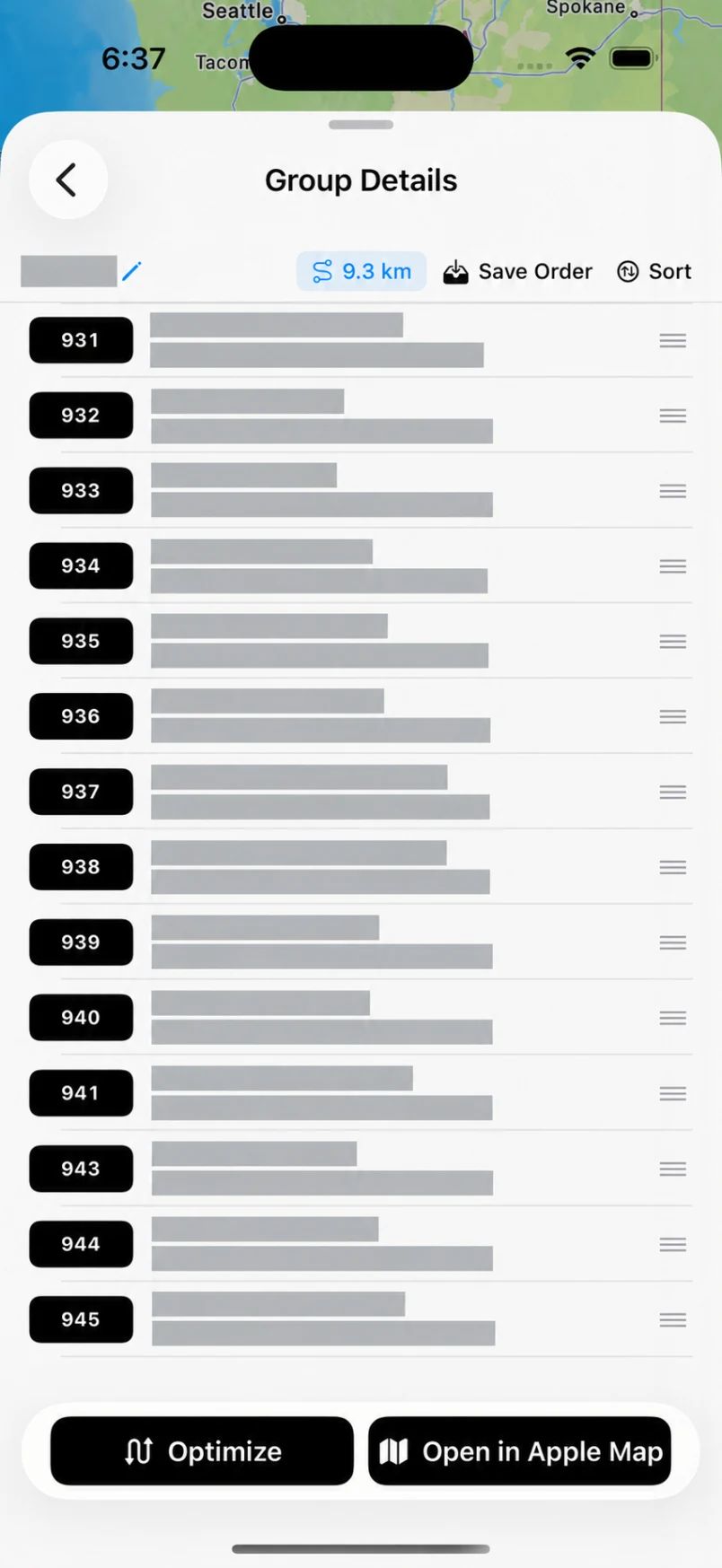
Review and organize the visit order before sending route groups to Apple Maps

3

Push to Apple Maps

Send the route into Apple Maps in one action and start moving immediately.

See the 14-Stop Apple Maps Handoff

This is the core advantage: other apps push one stop at a time. NaviBatch sends the route in one push.

14 stops. One push.

Watch NaviBatch hand Apple Maps a full delivery run in one action.

14 stops to Apple Maps
One push instead of repeated taps
Built for full delivery runs

Proof of Delivery

A powerful delivery proof system available even in the free version

1

Door Number Photo

Capture clear images of door numbers, ensuring digits/letters are visible

2

Package Label Photo

Photograph package labels to ensure recipient information is clearly visible

3

Placement Photo

Capture the final placement of packages, providing complete delivery proof

Benefits of Proof of Delivery

  • Reduces "package not received" complaints by 80%
  • Provides legal protection for delivery personnel
  • Smart Photo Album System - Photos auto-organized by route name + date
  • Easily manage 600-900 photos from 200-300 packages daily
  • Find or delete specific photos weeks or months later with ease
  • Uses structured workflow to ensure complete documentation
  • Complete photo functionality in the free version
"Since using NaviBatch's proof of delivery feature, our 'package not received' complaints have decreased by 80%. Customers can clearly see the package has been delivered, and we have complete records as proof."

— Delivery Company Manager

Success Stories

Real results from delivery professionals using NaviBatch

This delivery company saves 2 hours of route planning time every day with NaviBatch

Read Case Study

This courier reduced repeated route setup work using NaviBatch

Read Case Study

This logistics team keeps delivery photos and route records organized

Read Case Study

Pricing

Download the app for free and unlock premium features with in-app purchases

Free

$0

Download from App Store

  • Route Optimization
  • Unlimited Routes
  • Unlimited Optimizations
  • Max 20 Addresses per Route
  • Smart Route Optimization
  • Auto Grouping (Up to 10 addresses) NEW
  • One-Click Navigation (1 group, up to 10 addresses) PATENT PENDING
  • Package Finder
  • File Import
  • Batch Address Paste
  • Proof of Delivery
  • Smart Photo Albums
  • Review routes before driving
Download Free

Expert

$5.00/month

In-app Purchase

Billed yearly at $59.99

Free 14-Day Trial
  • All Pro Features
  • Unlimited Routes
  • Unlimited Optimizations
  • Larger route workflows
  • Smart Route Optimization
  • Auto Grouping (advanced groups)
  • One-Click Navigation (multiple route groups) PATENT PENDING
  • Package Finder
  • File Import
  • Batch Address Paste
  • Proof of Delivery
  • Smart Photo Albums
  • Reduce repeated route setup
  • Annual Savings of 31%
Download App

Download NaviBatch Today

iPhone Exclusive Optimized for professional delivery

Batch Navigation PATENT PENDING

Review route groups and send stops to Apple Maps with fewer repeated actions

Proof of Delivery

Built-in photo capture and verification for proof of delivery

Delivery Optimized

Specially designed navigation experience for delivery professionals

Contact Us

Have questions or need support? Our team is here to help you

Email

General Inquiries: info@navibatch.com
Technical Support: supports@navibatch.com

Frequently Asked Questions

Everything you need to know about NaviBatch route planning app

What makes NaviBatch faster than manual Apple Maps setup?

NaviBatch reduces repeated work by importing addresses from delivery screenshots, photos, videos, files, pasted text, or manual entry, then helping drivers review, group, and send planned stops to Apple Maps with a patent-pending one-push handoff workflow.

Is NaviBatch really free for delivery drivers?

Yes. NaviBatch offers a useful free version with up to 20 stops per route, auto grouping (up to 10 addresses), one-click navigation (1 group), package finder, proof of delivery photos, smart photo albums, and route planning tools for delivery drivers, couriers, and small logistics operations.

Can NaviBatch help reduce wasted route setup time?

Yes. NaviBatch helps drivers spend less time retyping addresses and repeatedly pushing stops into Apple Maps. Better route preparation can also reduce avoidable backtracking, but actual driving time and fuel use depend on traffic, route conditions, vehicle type, and delivery workflow.

Does NaviBatch work for larger multi-stop delivery runs?

The free version supports up to 20 stops, while paid plans support larger delivery workflows with route grouping, review, and Apple Maps handoff. Apple Maps handoff works in route groups, including NaviBatch's core 14-stop one-push workflow.

What's included in NaviBatch's proof of delivery feature?

NaviBatch includes comprehensive proof of delivery in the free version - capture door numbers, package labels, and placement photos. Our smart photo album system automatically organizes photos by route and date, making it easy to manage hundreds of delivery photos daily.

How does NaviBatch compare to other delivery route planning apps?

NaviBatch is focused on iPhone delivery workflows: importing addresses, reviewing stops, grouping routes, one-push Apple Maps handoff, package finder, proof of delivery, and smart photo albums. Comparison pages should be checked for current competitor limits before making specific claims.

Ready to boost your route planning efficiency?

Download NaviBatch now to plan delivery routes with fewer repeated actions.

Download Free