
Courier-list input
Start from screenshots, long images, videos, files, pasted text, or manual entry.
NaviBatch helps iPhone drivers who work with GoFo, SpeedX, Swiftx, CaiNiao, and similar delivery lists. Import screenshots or videos, confirm addresses, group stops, and hand up to 14 stops to Apple Maps in one push.
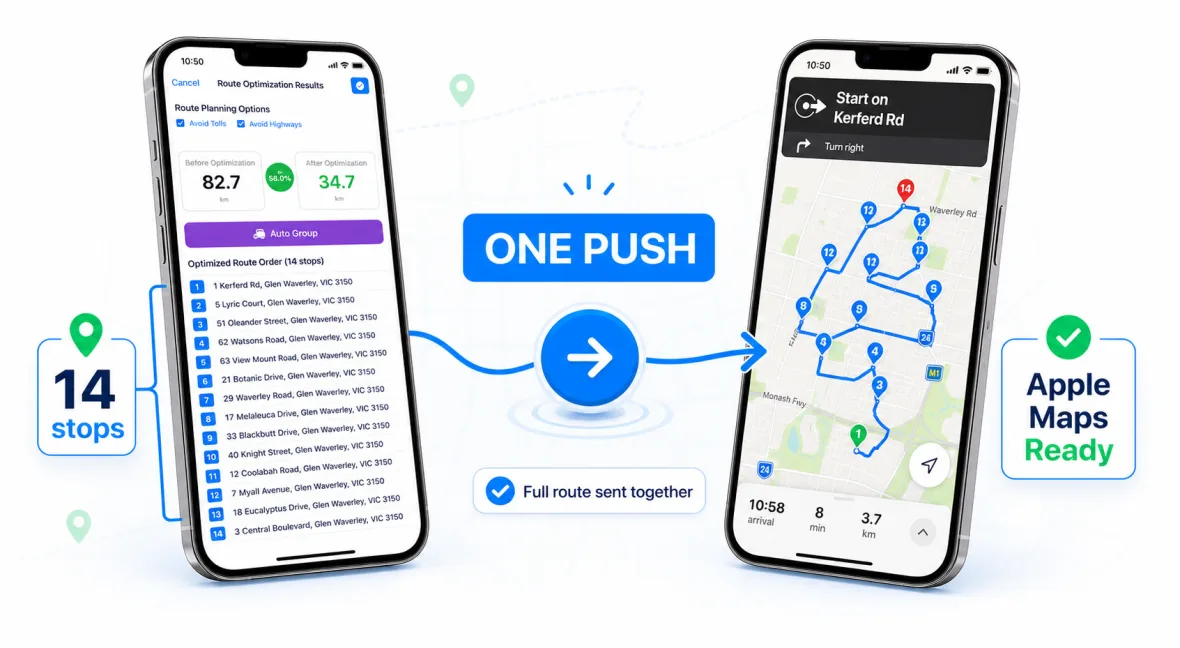
Many US Chinese delivery drivers work across courier platforms where the stop list is shown inside another app, group chat, screenshot, or screen recording. A generic route planner can miss the daily workflow: extract addresses quickly, keep order numbers visible, and use Apple Maps without rebuilding every stop by hand.
NaviBatch is designed around that friction. It focuses on getting delivery data out of the phone screen and into a reviewed route, then moving a clean group of stops into Apple Maps.
Start from screenshots, long images, videos, files, pasted text, or manual entry.
Keep delivery sequence numbers visible so the route still matches the driver's package workflow.
Send a reviewed group of up to 14 stops to Apple Maps in one action.
Import visible order numbers and addresses from screenshots or video scrolls.
Turn route lists into editable stops before grouping and navigation.
Handle delivery-list style input where the driver needs fast address extraction.
Combine manual stops, pasted addresses, screenshots, files, and video import in one route.
Chinese-speaking delivery drivers in the United States often move between English street addresses, Chinese team messages, apartment details, and courier lists. NaviBatch keeps the imported address and visible stop details together while each route or group is reviewed.
Use the English or Simplified Chinese guide for the same practical workflow: import the driver-supplied list, check the addresses, choose full-route or group-level planning, then hand the reviewed group to Apple Maps.
No. NaviBatch is an independent route planning app. It is designed to support the delivery-list workflows that drivers may use with those services.
Yes. NaviBatch supports Chinese-speaking delivery workflows and provides direct support paths through the app.
Many iPhone drivers already prefer Apple Maps for navigation. NaviBatch improves the setup step before navigation begins.
Try NaviBatch if your route starts from screenshots, videos, order numbers, and Apple Maps.
Download NaviBatch