Driver-side route setup
NaviBatch is not an enterprise dispatch console. It is a phone-first workflow for drivers managing many delivery addresses from their own iPhone.
For many last-mile drivers, the company stop label is also a package-loading reference. NaviBatch lets the driver keep those labels visible, define practical groups, optionally improve the visit order inside the active group, and hand the reviewed group to Apple Maps. For address lists that can be freely reordered, route-wide optimization is also available.
A last mile delivery route setup app helps drivers organize delivery addresses before they start driving. For independent drivers, couriers, and gig workers, the real problem is often not turn-by-turn navigation. It is preparing the route from messy inputs: screenshots, long images, dispatch lists, videos, pasted text, customer messages, or manual notes.
For dense last mile work, a company-provided stop label may also guide scanning, marking, and package placement. A route-wide reorder can help when the list is freely reorderable, but it may add package-search time when the vehicle was loaded around that company sequence.
NaviBatch supports both cases. Drivers can optimize a freely reorderable route across the full list, or keep imported company stop labels visible, create loading-aware groups, and optionally improve only the active group before Apple Maps handoff.
NaviBatch is not an enterprise dispatch console. It is a phone-first workflow for drivers managing many delivery addresses from their own iPhone.
Use screenshots, long images, videos, files, pasted text, or manual entry when the address list does not arrive cleanly.
In a dense area, a different visit order may save distance yet still cost time if the driver can no longer find packages in the order they were loaded.
Normal navigation starts with a destination. Last mile delivery may start with company stop labels that also tell the driver how packages were scanned, marked, or placed in the vehicle. Those labels need to stay visible even when the driver changes the visit order inside one group.
NaviBatch treats the imported label and the planned visit order as different pieces of information. The driver can keep the company label as the package reference while deciding whether the full route or only one active group should be optimized.
Dense suburban or city routes can place many deliveries close together. Route order still matters, but the distance gain from reordering may be small compared with the time lost in setup and package handling.
OCR can misread unit numbers, street suffixes, or repeated-looking addresses. A review step reduces blind trust in imported text.
If packages were loaded around a company sequence, the driver can use that sequence to define group boundaries instead of automatically replacing the whole loading framework.
Bring in visible addresses and stop labels from screenshots, long images, videos, files, pasted text, or manual entry, then review them.
Choose a practical group that matches the package-loading setup and the Apple Maps handoff limit.
Keep the current order, adjust it manually, or optionally improve only the active group while company labels stay visible.
Review the planned order, then send up to 14 delivery addresses to Apple Maps in one push.
If every address can be freely reordered, NaviBatch can optimize the route across the full list before groups are prepared. If imported company stop labels also guide package loading, the driver can keep that sequence as the operating framework and optionally optimize only a driver-defined group.
Group optimization changes the planned visit order inside the selected group while the imported company label remains visible as a package reference. The original group order can be restored. Neither workflow guarantees the shortest or fastest possible route.
| Selection factor | Why it matters | NaviBatch approach |
|---|---|---|
| Input source | Drivers may receive routes as screenshots, videos, files, copied text, or handwritten notes. | Supports screenshots, long images, videos, files, pasted text, and manual entry. |
| Package workflow | Drivers may load packages around a company-provided sequence before driving. | Lets the driver choose route-wide optimization or preserve the company sequence as the framework for driver-defined groups. |
| Optimization scope | Freely reorderable lists and scan-and-load routes need different planning boundaries. | Supports full-route optimization or optional optimization inside one active group. |
| Company stop label | The imported label can remain the physical package reference even if visit order changes. | Keeps the company label visible and stores the group visit order separately. |
| Review step | Apartment numbers, unit notes, and OCR-sensitive text should be checked before driving. | Keeps review before routing so drivers can correct addresses before map handoff. |
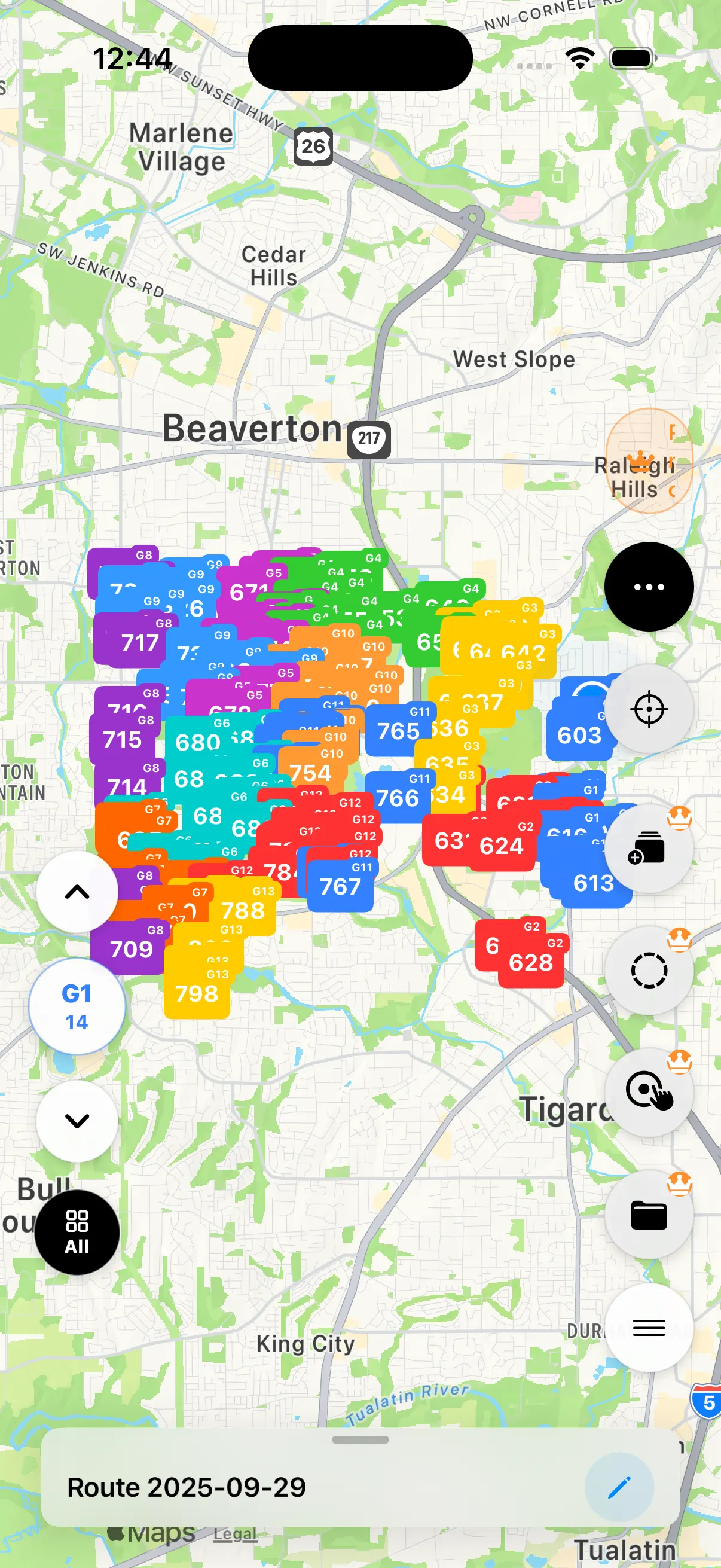
| Map readability | Too many markers can make dense delivery areas hard to read. | Uses route groups and focused group review so drivers can work one group at a time. |
| Navigation app | Apple Maps handles turn-by-turn navigation after the route group is prepared. | Sends up to 14 planned stops to Apple Maps in one push; other map apps are additional, version-dependent options. |
NaviBatch is most useful when drivers already have a delivery list but need a faster way to prepare it on iPhone. That includes dense courier runs, local package delivery, small business deliveries, and gig workflows where delivery addresses are copied from another screen.
The driver chooses the planning scope: optimize a freely reorderable route across the full list, or keep company stop labels visible and improve only a loading-aware group. After review, the selected group can be sent to Apple Maps. Other map apps remain additional, version-dependent options.
Small setup mistakes can become expensive once the driver is on the road. A practical route planning workflow should reduce repeated manual entry without hiding the review step.
Address recognition is useful, but drivers should still confirm units, apartment numbers, street names, and repeated-looking addresses.
In delivery work, the address and the package identifier need to stay connected. A route that looks efficient can still fail if the driver loses the stop context.
A dense map can become hard to read. Group-focused review helps drivers work through the route without losing the full delivery picture.
NaviBatch is a strong fit for iPhone drivers who need a better way to prepare delivery addresses before navigation. It is also useful when delivery lists are not cleanly typed, when company stop labels matter during package lookup, or when the route has enough addresses that one crowded map becomes hard to read.
It may not be the right tool for a company that needs a full fleet dispatch console, live driver assignment, warehouse routing, or enterprise compliance workflows. NaviBatch is intentionally focused on the driver-side route setup and map handoff before driving.
A last mile delivery route planner helps drivers prepare delivery addresses before navigation starts. NaviBatch imports and reviews addresses, then lets the driver use route-wide optimization for freely reorderable lists or driver-defined group optimization when company stop labels and loading order matter.
Last mile drivers often start with many addresses, package numbers, apartments, unit details, and screenshots or dispatch lists. In dense routes, setup and review can be a bigger bottleneck than route order alone.
Yes. NaviBatch can send up to 14 planned delivery addresses to Apple Maps in one push after driver review. Other map apps are additional, version-dependent handoff options.
Yes. Route-wide optimization remains available for address lists that can be freely reordered. For company-sequenced scan-and-load routes, this page recommends a driver-defined, group-first workflow instead.
Only the visit order inside the selected group changes when the driver chooses group optimization and NaviBatch finds an improvement. Imported company stop labels remain visible as references, and the original group order can be restored. NaviBatch does not guarantee the shortest possible route.
Yes. NaviBatch supports delivery address import from screenshots, long images, videos, files, pasted text, and manual entry. Drivers should review detected addresses before routing.
Yes. Review is important because real delivery lists can include OCR mistakes, apartment numbers, duplicated-looking addresses, missing unit details, and package numbers that need to stay connected to the correct stop.
No. NaviBatch does not connect to a courier company's private order or warehouse system. The driver imports visible addresses and labels, reviews them, and chooses the group boundaries that fit the day's loading setup.
No. NaviBatch is an independent iPhone route planning app built for drivers who need a practical way to prepare and hand off reviewed delivery address groups to Apple Maps.
Use NaviBatch to import, review, group, and hand off delivery addresses from your iPhone.
Download NaviBatch